Stop re-pasting API keys into every AI agent.
Keep Claude Code, Codex, OpenClaw, and Hermes on the same provider (API keys, endpoints, and models) across laptops and servers.
Get KeySync on your computer
KeySync runs on your desktop. Copy this link and open it on your computer.
- Backup before every write
- End-to-end encrypted
- Writes each tool's native config
Provider configs drift across machines.
- Your CC Switch setup works on one machine, then every new laptop or server starts from zero.
- Mac, Windows, Linux, desktop, notebook — API keys, endpoints, and models fall out of sync.
- Team setup turns into copied secrets in chat when someone needs the same key or endpoint.
- When a provider rate-limits while you're away, switching models still depends on the right machine.
How to get started
- 1 Download KeySync Get the installer for macOS, Windows, or Linux
- 2 Install and connect KeySync auto-detects your existing tools and settings
- 3 Manage from any browser Update keys, models, and endpoints — all synced
Three steps. Then never touch a config file again.
Build a provider profile
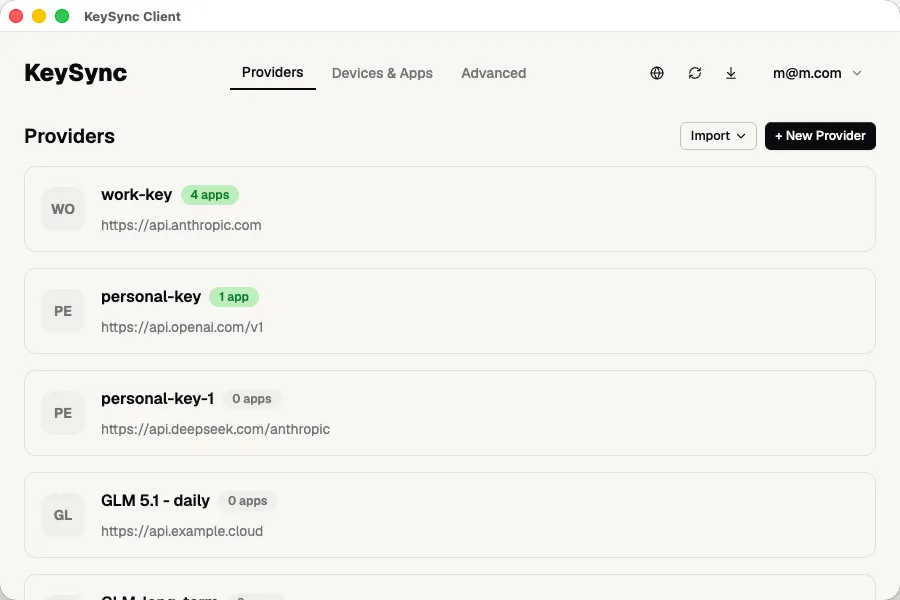
Bundle your API keys, default models, and custom endpoints into one profile — Anthropic, OpenAI, Google, OpenRouter, or your own local gateway.
Pick your tools
Choose which agents and tools KeySync manages: Claude Code, Codex, OpenClaw, Hermes, and more.
Sync everywhere
KeySync writes each tool's native config for you. Change a key once and it lands in every tool, on every machine.
Four guarantees carry through the workflow, no matter which provider or agent you connect.
-
One source of truth
Keys, models, and endpoints live in one profile, so rotations happen once.
-
Native to every agent
KeySync writes each agent's own format and file location, with no wrapper to learn.
-
Encrypted, everywhere
Keys are encrypted on device before sync; the cloud only stores ciphertext.
-
Safe by default
Every write starts with a local backup, and apply reports show what synced.
Sync keys without losing control.
Secrets are encrypted before they leave your machine. Local configs are backed up before every write.
- Encrypted before it leaves your machineYour keys are encrypted client-side — the cloud only ever stores ciphertext.
- Local backup before every writeEach tool's existing config is saved locally first, so a sync can never silently overwrite your setup.
- Visible status instead of silent failureApply reports flag which devices synced and which still need attention.
- Writes the explicit config files your tools already readKnown files in their own formats — no vague compatibility claim.
Good things to know
Which AI agents and tools does it support?
The ones you already run — Claude Code, Codex, OpenClaw, and Hermes, with more added regularly. KeySync writes each one's native config file, so support is really just about knowing the format.
How are my API keys stored?
Keys are encrypted on your machine before they're ever uploaded. The cloud stores only encrypted data so your setup can follow you across devices — but your secrets stay yours.
What if a sync breaks my config?
It won't silently. KeySync saves a local backup of each file before writing, and the apply report flags any device that didn't sync cleanly — so failures are visible rather than silent.
Can I use custom endpoints or a local gateway?
Yes. Set a custom base URL per provider — a proxy, a self-hosted gateway, or a local model server — and KeySync points every tool at it.
Do my agents need to change anything?
No. KeySync writes the same config files your agents already read. There's nothing for them to integrate with and nothing new to learn — KeySync is the key and config layer beneath them, not another agent.
Set it once. Sync it everywhere.
Download the desktop client, connect your first provider, and push your config to every AI agent in under a minute.